


Dots for Slack
Bring IT operations into Slack. Get real-time updates, approve actions, and stay aligned – without leaving Slack.


What you can do with Dots in Slack


Set up the Dots Slack integration
Create a dedicated Slack channel
- Open Slack and log in to your workspace.
- Click the arrow next to Channels and select Create channel.
- Name the channel (for example: #dots-updates).
- Choose whether the channel should be public or private.
- Click Create and add relevant team members (or skip for now).

Connect Slack to Dots
- Go to the Integrations page in your Dots dashboard.
- Select Slack and click Allow & Continue.
- Choose the Slack workspace you want to connect to.
- Select the Slack channel you created in Step 1.
- Click allow and continue.
Once authorized, you’ll be redirected back to Dots and see a confirmation that Slack is connected.

Add the Dots app to your Slack channel
To allow Dots to post messages into your channel:
- Go back to Slack and open the channel you created.
- Type @Dots in the message box.
- Select Dots App from the dropdown.
- When prompted, click Add to Channel.

Real Slack message examples
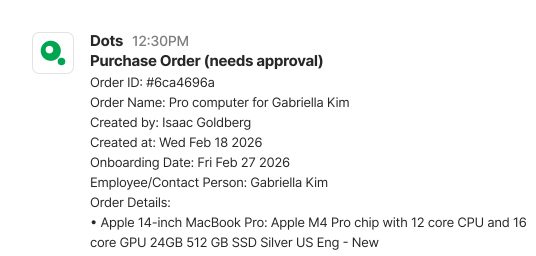
Your purchase offer is ready (actionable)
When our procurement team uploads a quote, you’ll get a Slack notification to review the order details and approve the offer instantly.

Your devices have arrived at the warehouse
Receive a Slack notification when your order arrives at our warehouse so you can review the delivery details and track your inventory.
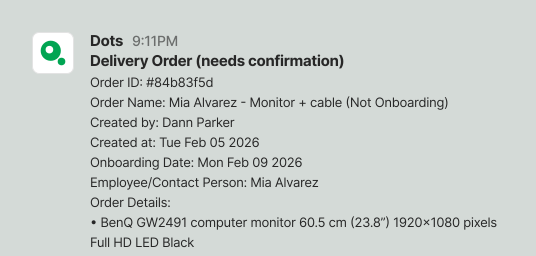
Delivery confirmation available (actionable)
The delivery has been completed and awaits confirmation. Confirm directly from Slack, or Dots will finalize it after a few days.
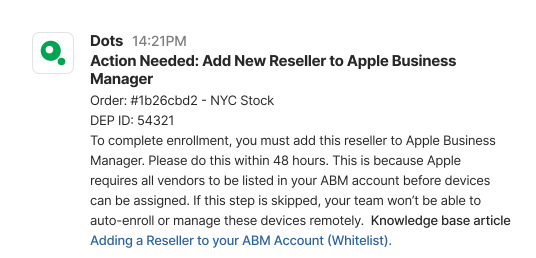
Action required: add a reseller to Apple business manager
Get notified in Slack when a new vendor must be added to your Apple Business Manager account so devices can be automatically enrolled and managed.
Partner with Dots
Does your solution enhance IT, HRIS, MDM, security, or payroll automation? Partner with Dots to deliver powerful integrations that streamline workflows, automate tasks, and boost productivity. If you use a platform that could integrate with Dots, let’s connect and explore the possibilities together!


